Evaluation workflow
Langfuse evaluation follows a continuous improvement loop with four jobs:
- Instrument -> Collect representative traces with Langfuse Observability.
- Annotate -> Turn traces into evaluation assets with human annotations, annotation queues, scores, and datasets.
- Deploy -> Validate changes before shipping with experiments, benchmarking, and CI/CD regression checks.
- Monitor -> Score production behavior with automated online evaluators, analyze results in Score Analytics, and feed new failures back into annotation.
Work through the loop continuously: collect traces, turn them into failure modes, validate changes against those failure modes, and use production monitoring to find the next examples to annotate.
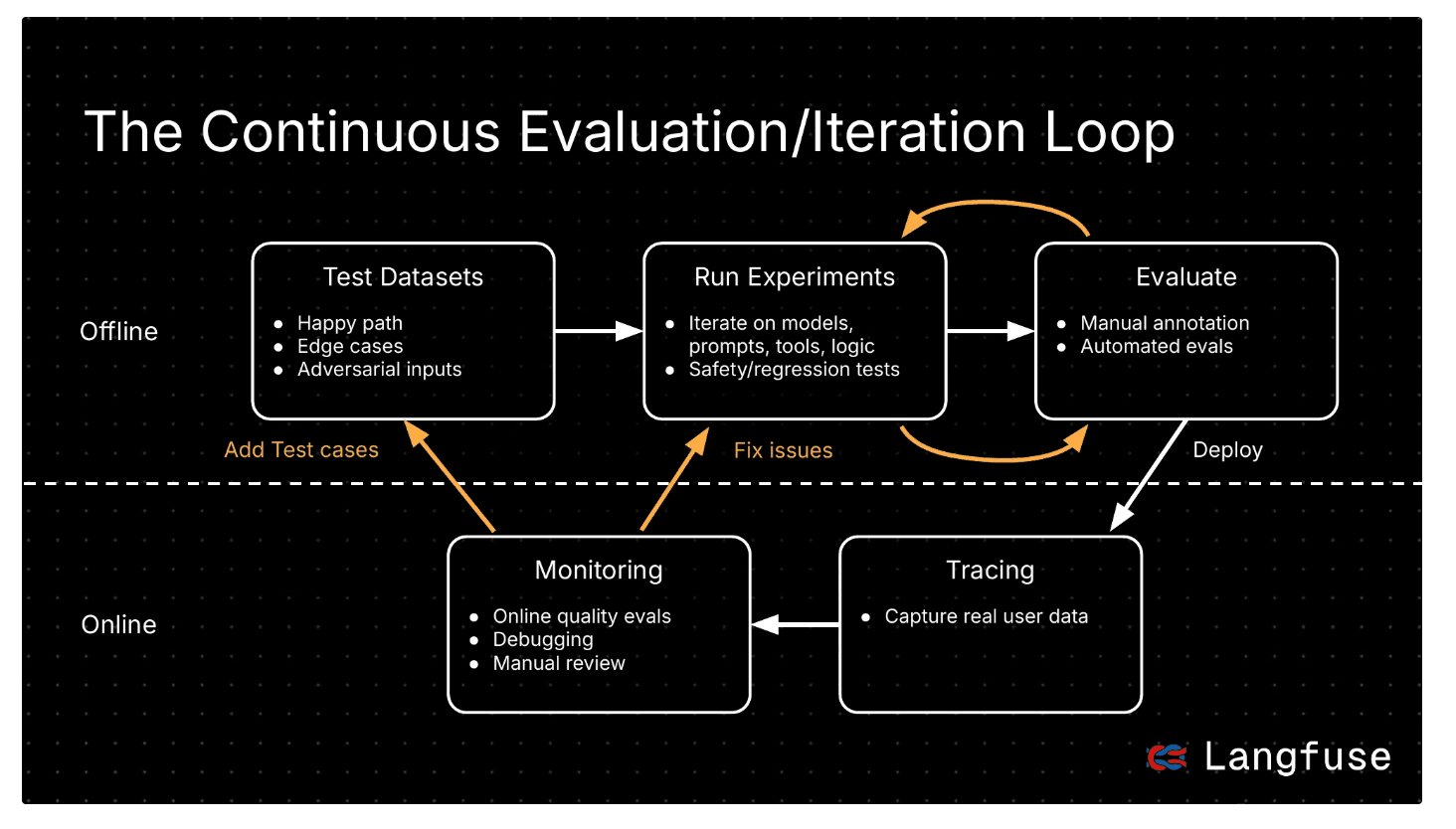
Instrument
Collect the evidence you need to evaluate your application. Start with traces that show what users asked, what your system did, and where the output came from.
- Capture traces and observations for user interactions, model calls, tool calls, retrieval steps, and final outputs.
- Use the observability data model to pick the right evaluation unit: trace, observation, generation, session, or dataset run.
- Add tags, metadata, users, sessions, environments, and releases so you can slice behavior later.
Annotate
Turn raw traces into reusable evaluation assets. Annotate representative examples, name the failure modes, and convert them into datasets and score definitions.
- Build an initial dataset from representative traces or observations. Aim for roughly 100 diverse, high-quality examples when possible.
- Use Annotation Queues, manual scores via UI, and
TEXTscores for open coding: review traces and write short notes about the first thing that went wrong. - Group notes into failure modes (axial coding), then convert stable categories into score types and score configs.
For a detailed walkthrough, use the error analysis guide to open-code traces, cluster failure categories, label examples, and decide which failures should become evaluators.
When you find a failure, reduce it to a reusable test case. For conversational systems, add the minimal reproduction or the N-1 turns before the failure to a dataset. Over time, your dataset becomes a regression set built from real-world behavior.
Deploy
Ship tested changes with measurable impact. Use experiments to confirm that a prompt, model, retrieval configuration, agent implementation, or evaluator variant improves quality without introducing regressions.
- Run experiments via UI for prompt and model iterations, or experiments via SDK for application and agent logic.
- Use datasets as stable test cases and score outputs with LLM-as-a-Judge, Scores via API/SDK, or Scores via UI.
- Use experiments for active iteration, benchmarking, and release regression checks. Run them manually during development or automatically in CI/CD before merge or deploy.
Experiments are useful in three common deployment workflows:
| Workflow | Use experiments to |
|---|---|
| Active iteration | Hill climb on a prompt, model, or agent implementation while engineering a change. |
| Benchmarking | Compare multiple implementations on the same dataset and scoring criteria. |
| Releasing / deploying | Run regression checks before merge or deploy so quality drops do not ship. |
Monitor
Monitor production with the failure modes you already annotated. Use online evaluators to score live behavior, catch quality issues after deployment, and discover the next examples to review.
- Turn annotated failure modes into online evaluators with LLM-as-a-Judge or custom scores via API/SDK.
- Prefer observation-level evaluators when the failure can be judged on a specific model call, tool call, retrieval step, or final generation.
- Use Score Analytics and custom dashboards to track distributions, trends, evaluator agreement, and regressions; when monitors reveal new patterns, send them back to annotation.
Start with a small number of high-signal LLM-as-a-Judge or custom evaluators derived from known failure modes, then expand coverage as new failures appear.
Which Langfuse feature should I use?
| If you want to... | Use this Langfuse feature |
|---|---|
| Capture application behavior | Observability, traces and observations |
| Segment traces for later review | Tags, metadata, users, sessions, environments, releases |
| Review examples manually | Annotation Queues, Scores via UI |
| Open Coding: capture open-ended notes | TEXT scores, Annotation Queues |
| Axial Coding: derive failure modes | Score configs, categorical/boolean scores |
| Create reusable test cases | Datasets |
| Compare changes before shipping | Experiments via UI, Experiments via SDK |
| Gate pull requests or deploys | CI/CD experiments |
| Monitor production quality | LLM-as-a-Judge, Scores via API/SDK |
| Analyze evaluator results | Score Analytics, custom dashboards |

